Career Goals
Set and track meaningful career goals with AI-guided creation and progress insights that connect your daily work to long-term aspirations.
Introduction
Career Goals is a comprehensive feature that helps you:
- Define meaningful career goals through AI-guided conversation that understands your context
- Organize goals by category across four key areas: Career Direction, Skill Building, Performance, and Wellbeing
- Break goals into milestones with AI-suggested checkpoints tailored to your timeframe
- Track progress automatically based on your reflections, accomplishments, and milestone completion
- Generate actionable activities with AI suggestions tailored to your goals
- Connect daily work to aspirations through explicit goal alignment in weekly reflections
Goals follow a balanced portfolio approach, with recommended limits per category to ensure focused, achievable growth.
Getting Started
Creating Your First Goal
Navigate to the Goals page and click “Create Goal”. You’ll be presented with two options:
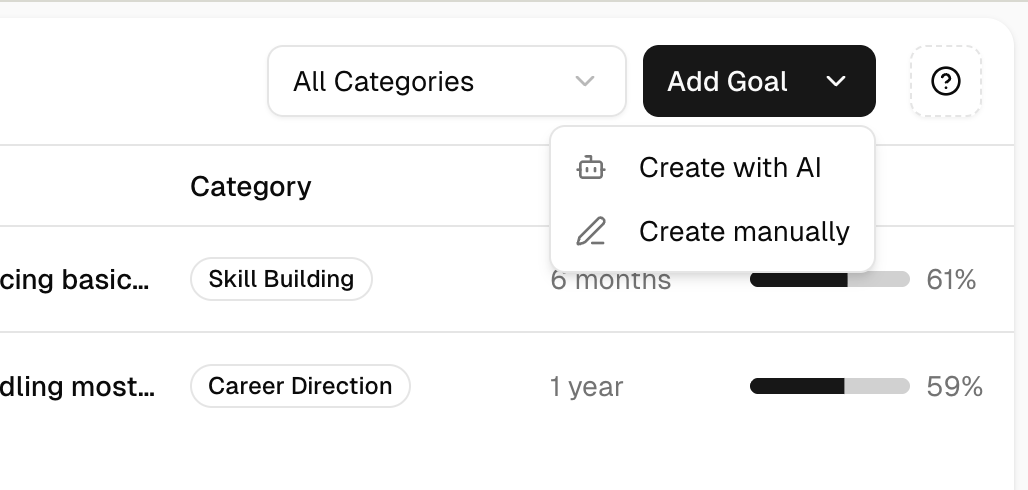
AI-Guided Creation (Recommended):
- Have a natural conversation with an AI coach
- The AI asks questions to understand your aspirations
- Your goal is automatically structured with motivation, signals of progress, and success criteria
- Best for: discovering goals you haven’t fully articulated yet
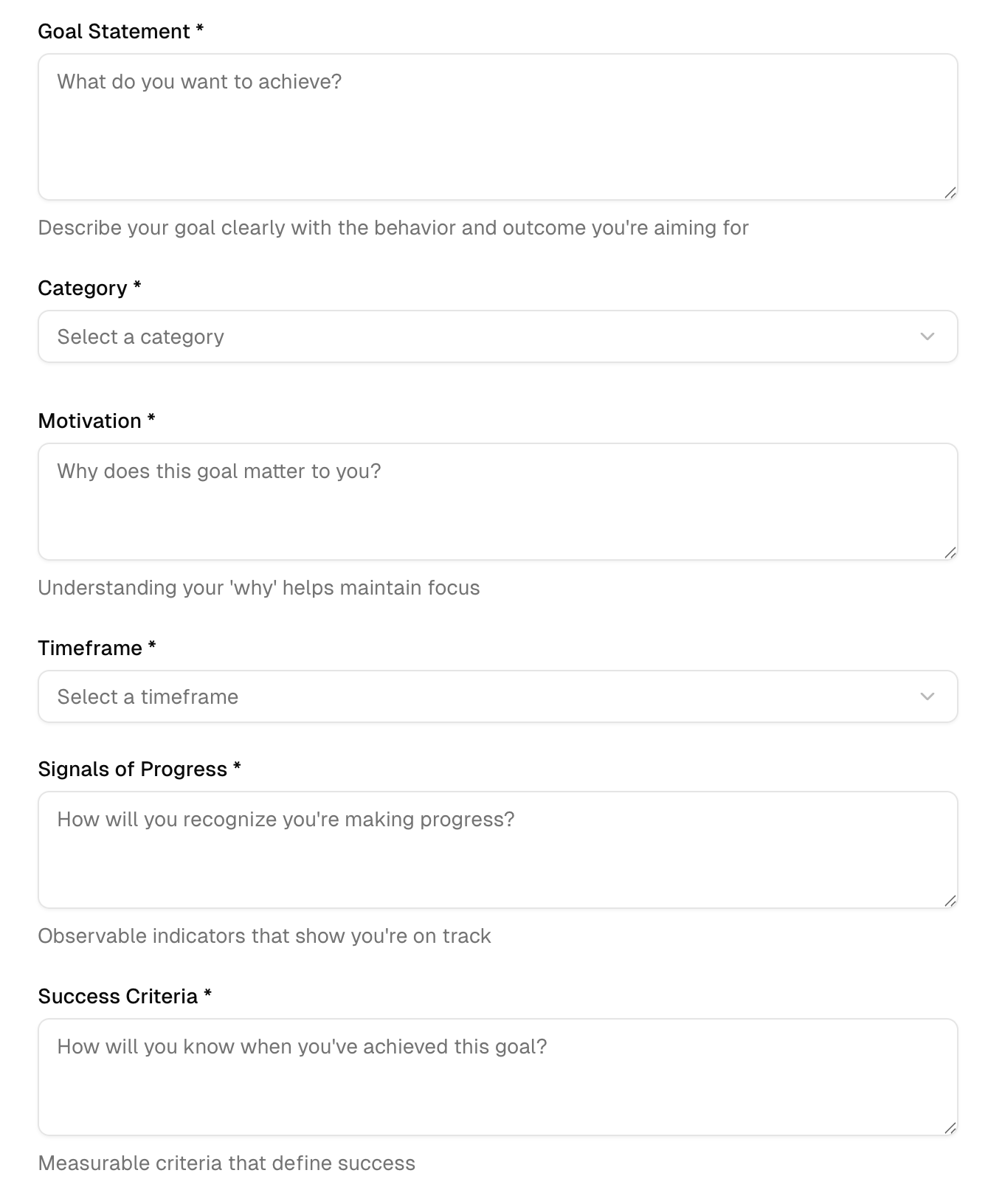
Manual Creation:
- Fill out a structured form directly
- Define all goal attributes yourself
- Best for: when you already know exactly what you want to achieve
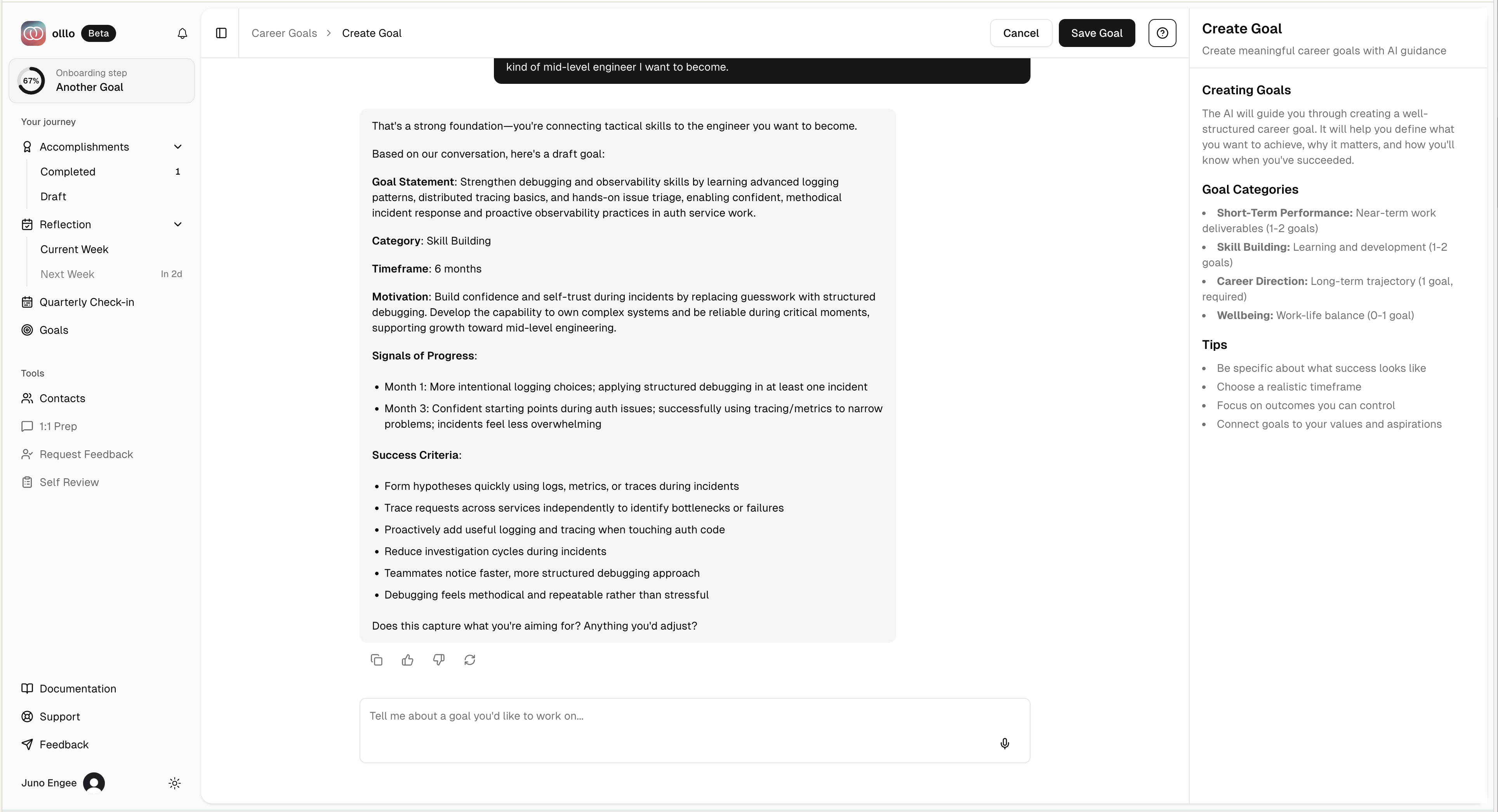
AI-Guided Goal Creation
The recommended approach is to create goals through conversation. The AI adapts its questions based on your work context and existing goals.
The Conversation Flow
1. Initial Exploration The AI starts by asking about your career aspirations in an open-ended way. You can share:
- A specific goal you have in mind
- A general area you want to grow in
- Challenges you’re facing that you want to overcome
2. Clarification & Refinement Based on your response, the AI asks follow-up questions to understand:
- Why this goal matters to you (motivation)
- How you’ll know you’re making progress (signals)
- What success looks like (criteria)
- When you want to achieve this (timeframe)
3. Goal Extraction Once the AI has enough information, it summarizes your goal and asks for confirmation. You can:
- Accept the suggested goal
- Request adjustments
- Continue the conversation to refine further
4. AI-Suggested Milestones When your goal is created, the AI automatically suggests milestones based on your timeframe:
- 30-day goals: 3 milestones
- 90-day goals: 4 milestones
- 6-month goals: 5 milestones
- 1-year goals: 6 milestones
- 2-year goals: 8 milestones
Each milestone includes a suggested target date to help you stay on track. You can modify, add, or remove milestones after goal creation.
Pre-Selected Categories
If you clicked on a specific category card from the dashboard (e.g., “Skill Building”), the AI will focus the conversation on that area while still allowing flexibility.
Manual Goal Creation
For users who prefer direct input, the manual form provides full control over goal definition.
Form Fields
Category (Required) Choose one of four categories:
- Career Direction: Long-term career path goals (1-2 year horizon)
- Skill Building: Skills you want to develop (3-12 month horizon)
- Short-Term Performance: Near-term work goals (30-90 day horizon)
- Wellbeing: Work-life balance goals (ongoing)
Goal Statement (Required) A clear, specific statement of what you want to achieve. Good statements are:
- Specific (not vague)
- Meaningful to you
- Achievable within your chosen timeframe
Timeframe (Required) Select from: 30 Days, 90 Days, 6 Months, 1 Year, or 2 Years. This helps frame your progress expectations.
Motivation (Required) Why is this goal important to you? What drives you toward this outcome? Understanding your “why” helps maintain commitment.
Signals of Progress (Required) Observable indicators that show you’re moving toward your goal. These should be concrete things you can notice or measure.
Success Criteria (Required) How will you know when you’ve achieved this goal? Define what “done” looks like.
Goal Dashboard
The dashboard provides a portfolio view of your active goals, organized by category.
Category Organization
Goals are grouped into four categories, each with recommended limits:
| Category | Limit | Typical Timeframe | Focus Area |
|---|---|---|---|
| Career Direction | 1 | 1-2 years | Long-term career trajectory |
| Skill Building | 2 | 3-12 months | Technical or soft skill development |
| Short-Term Performance | 2 | 30-90 days | Current role excellence |
| Wellbeing | 1 | Ongoing | Sustainable growth |
Total Portfolio: Maximum 6 active goals to ensure focus.
Goal Cards
Each goal appears as a card showing:
- Statement: The goal summary (truncated if long)
- Progress Ring: Visual indicator of current progress (0-100%)
- Category Badge: Color-coded category indicator
- Timeframe Badge: Time horizon for the goal
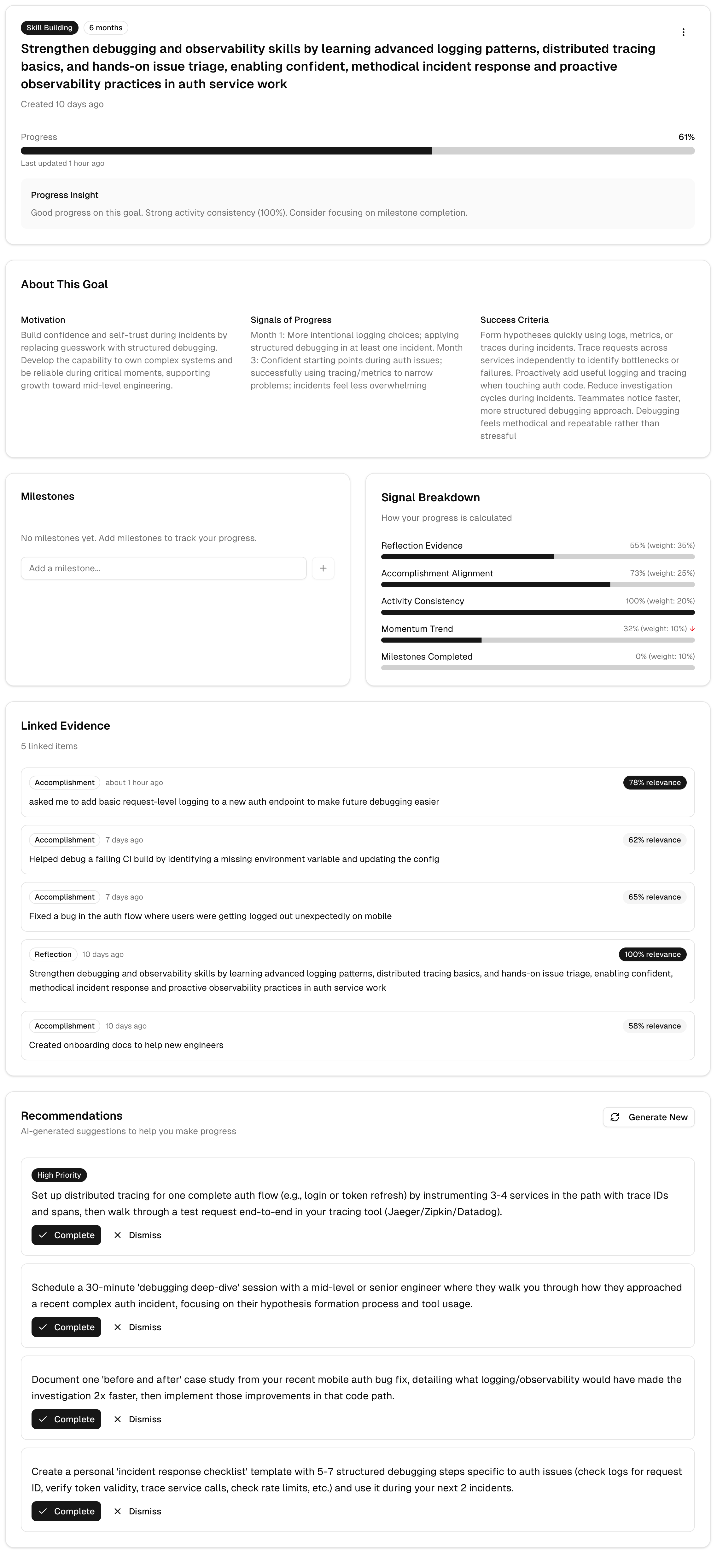
Progress Tracking
Progress is calculated automatically based on multiple signals from your activity:
Signal Breakdown:
- Reflection Evidence (35%) - How often your weekly reflections mention this goal
- Accomplishment Alignment (25%) - How many accomplishments connect to this goal
- Frequency Consistency (20%) - Regular activity toward the goal over time
- Sentiment Trend (10%) - Positive vs negative mentions in reflections
- Milestones Completed (10%) - Percentage of milestones you’ve checked off
Milestones
Milestones are checkpoints that break down your goal into smaller, actionable steps. They help you track concrete progress and maintain momentum.
Milestone Features:
- Toggle Completion: Click the checkbox to mark milestones as complete or incomplete (instant feedback under 200ms)
- Click to Edit: Click any milestone row to open the edit dialog and modify details
- Target Dates: See when each milestone should ideally be completed with calendar icon
- Overdue Indicators: Past-due incomplete milestones show red “Overdue” badge
- Source Badges: See where each milestone came from (AI, User, or Check-in)
- Add Milestones: Click “Add Milestone” button to create new milestones manually
- Delete Milestones: Hover over a milestone to reveal the delete button
Milestone Sources:
- AI: Automatically suggested when you create a goal through AI-guided conversation (sparkle icon)
- User: Manually added by you at any time (no badge shown - default expectation)
- Check-in: Suggested during weekly reflection check-ins
On-Demand Generation:
If you want fresh milestone suggestions, click “Regenerate Milestones” to open the regeneration dialog.
The dialog lets you choose which milestones to keep. Unselected milestones will be replaced with new AI suggestions tailored to your goal’s timeframe. The AI recommends keeping:
- Milestones you created manually
- Milestones suggested during reflections
- Milestones you’ve already completed
Completing milestones directly contributes to your goal progress through the “Milestones Completed” signal.
Activities
Track actionable tasks that move you toward your goal. Activities are concrete steps you can complete in 1-2 weeks.
Activity Features:
- AI Generation: Click “Generate” to get personalized activity suggestions based on your goal
- Status Tracking: Activities progress from Draft → Planned → Done
- Accept/Dismiss: Review AI-generated drafts and accept the ones that fit your situation
- Progress Connection: Completing activities demonstrates momentum toward your goal
Learn more: See Activities Documentation for detailed information on creating and managing activities.
Reflection Snippets
Relevant excerpts from your weekly reflections that mention or relate to this goal.
Goal-Reflection Integration
Your goals are deeply integrated with the weekly reflection experience.
During Reflections
When completing weekly reflections, the AI:
- Explicitly references your active goals at least 2 times
- Asks questions about goal progress
- Connects your accomplishments to relevant goals
Goal-Aligned Summaries
Your reflection summaries include explicit goal connections:
Automatic Progress Updates
After completing reflections, your goal progress is recalculated based on:
- New accomplishments that align with the goal
- Conversation content mentioning the goal
- Sentiment and frequency patterns
Frequently Asked Questions
How many goals should I have?
Recommended: 4-6 active goals across the four categories.
The portfolio approach ensures:
- Focus on what matters most
- Coverage of different time horizons
- Balance between career growth and wellbeing
Can I have multiple goals in one category?
Yes, within the category limits:
- Career Direction: 1 goal max
- Skill Building: 2 goals max
- Short-Term Performance: 2 goals max
- Wellbeing: 1 goal max
How is progress calculated?
Progress is calculated automatically from five signals:
- Reflection Evidence (35%): Mentions in weekly reflections
- Accomplishment Alignment (25%): Related accomplishments logged
- Frequency Consistency (20%): Regular activity over time
- Sentiment Trend (10%): Positive mentions vs challenges
- Milestones Completed (10%): Percentage of milestones checked off
If your goal has explicit milestones, the “Milestones Completed” signal is calculated as the percentage of milestones you’ve marked as complete. For goals without milestones, this signal uses check-in responses as a proxy.
How do milestones work?
Milestones are optional checkpoints that break your goal into smaller steps. When you create a goal with AI guidance, milestones are automatically suggested based on your timeframe. You can also add, edit, or delete milestones at any time from the goal detail view.
Tips for effective milestones:
- Keep milestone titles concise and actionable
- Use target dates to create accountability
- Check off milestones as you complete them to see your progress increase
- Add new milestones as you discover additional steps needed
What makes a good goal statement?
Good statements are:
- Specific: “Become proficient in system design” vs “Get better at engineering”
- Meaningful: Connected to your values and aspirations
- Achievable: Realistic within your chosen timeframe
- Observable: You can tell when you’re making progress
Can I change a goal’s category?
No. Categories are fixed after creation to maintain portfolio integrity. If you need to recategorize, archive the old goal and create a new one in the correct category.
What happens to my progress if I edit a goal?
Progress is preserved when editing. The system continues tracking from where you left off, even if you modify the statement or other fields.
How often should I check my goals?
Weekly: Review during your reflection to connect work to goals Monthly: Check progress and activities Quarterly: Evaluate if goals are still relevant; archive or add new ones
Can the AI help me discover goals?
Yes! The AI-guided creation is designed for discovery. Start a conversation even if you don’t have a specific goal in mind - the AI will ask questions to help you articulate what matters to you.
Tips for Effective Goal Setting
Start with Career Direction
Your long-term career goal provides context for all other goals. Define this first, then build supporting goals in other categories.
Make Goals Personal
Generic goals like “get promoted” are less motivating than personal ones like “develop technical leadership skills to mentor others.” The “why” matters.
Review and Adapt
Goals aren’t set in stone. As you learn and grow, refine your goals to stay aligned with your evolving aspirations.
Celebrate Progress
Even small progress matters. The progress ring isn’t just a tracker - it’s a reminder of how far you’ve come.
Use Activities
Generate AI-suggested activities for each goal to create a clear action plan. Complete activities one by one to build momentum and track your progress.
Leverage Milestones
AI-suggested milestones give you a roadmap from day one. Check them off as you complete them to build momentum and see tangible progress. Don’t hesitate to add your own milestones as you discover new steps along the way.
Getting Help
If you encounter issues with goals:
- Goal not saving? Ensure all required fields are filled in with valid content.
- Progress not updating? Progress recalculates after weekly reflections. Complete a reflection to see updates.
- Activities not appearing? Navigate to the goal detail page and click “Generate” to create AI-suggested activities.
- Can’t find archived goal? Check the “Archived” tab on the goals dashboard.
Ready to set your career goals? Navigate to the Goals page and click “Create Goal” to start building your goal portfolio.