Contacts
Manage privacy-safe labels for people and companies you reference in your accomplishments using olllo’s @-mention system.
What are Contacts?
Contacts are privacy-safe labels that let you reference people and companies in your accomplishments without storing identifiable information.
Instead of writing:
❌ "Worked with Jane Doe from Acme Corp"You use contacts:
✅ "Worked with @DirectManager from @MainClient"How It Works
- You create a label: Choose a meaningful name like
@DirectManager - You provide the real name: Stored separately, encrypted with AES-256-GCM
- You use the label: Only the label appears in your accomplishments
- You own your data: Real names are encrypted, protecting them from database breaches
Creating Contacts
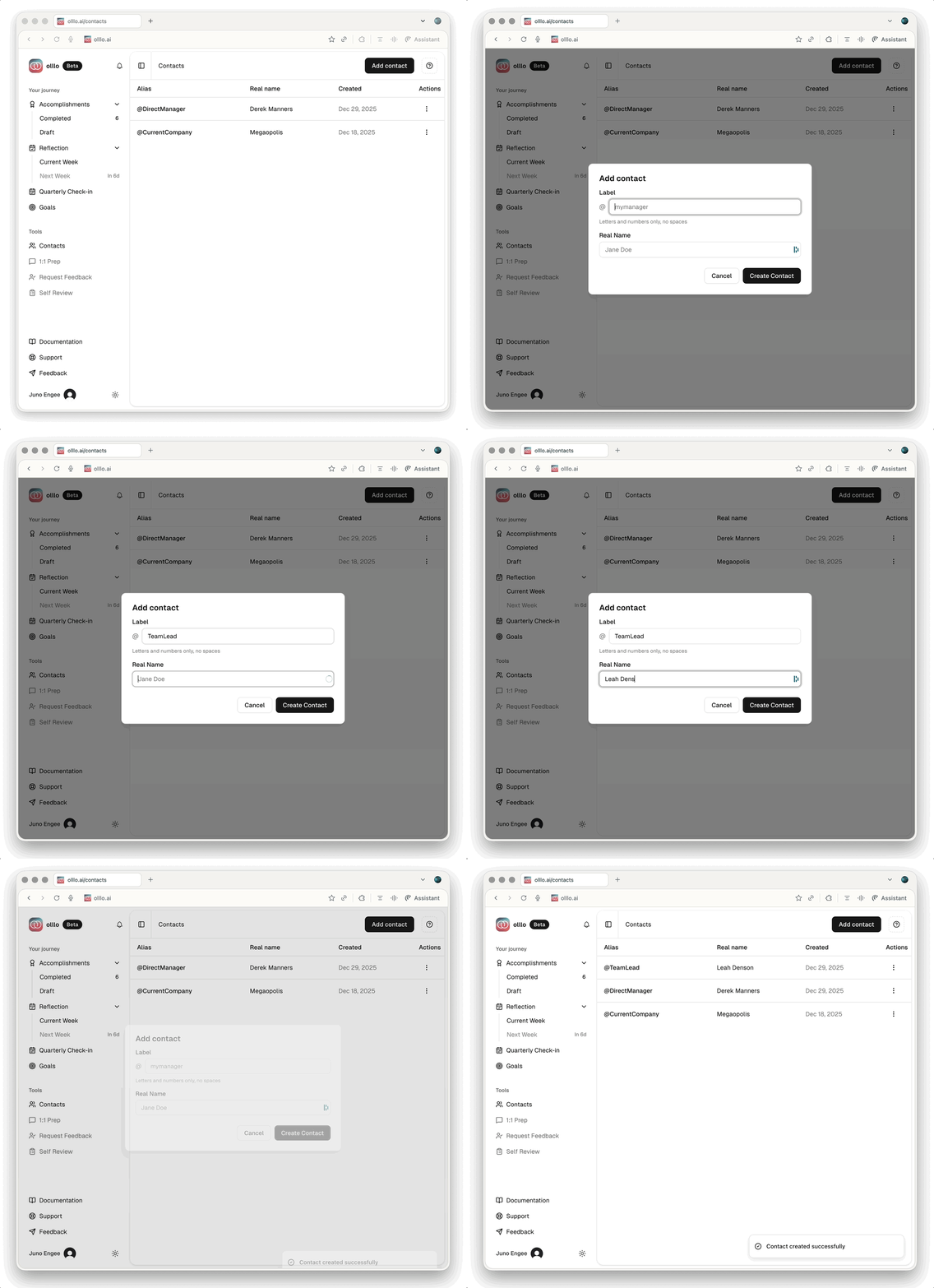
- Go to Contacts page
- Click Create Contact
- Enter a Label: Alphanumeric only, no spaces
- ✅ Valid:
DirectManager,designer1,MainClient - ❌ Invalid:
Direct Manager,Manager!,Person1
- ✅ Valid:
- Enter the Real Name: The actual person or company name
- Click Create
Label Format Requirements
Allowed Characters
Labels must be alphanumeric (letters and numbers):
✅ Valid Labels:
- @DirectManager
- @seniorEngineer
- @productLead2
- @MainClient
- @designer1

❌ Invalid Labels (automatically filtered):
- @Direct-Manager (hyphens removed → @DirectManager)
- @Senior Engineer (spaces removed → @SeniorEngineer)
- @Product Lead! (special chars removed → @ProductLead)
Label Best Practices
Create labels you’ll remember:
✅ Good Labels (self-explanatory):
- @DirectManager
- @SkipLevelManager
- @SeniorEngineer
- @ProductLead
- @UXDesigner
- @MainClient
- @PartnerCompany

❌ Vague Labels (hard to remember):
- @Manager1
- @Person2
- @Client
- @ColleagueTip: Use descriptive labels that indicate the relationship or role.
Using @-Mentions
In Accomplishments
When typing an accomplishment:
- Type
@to trigger the dropdown - See all your existing contacts
- Select one or create a new label
- The label is inserted automatically
Keyboard shortcuts:
↑↓Navigate optionsEnterSelect highlighted contactEscClose dropdown
Search and Filter
Type to filter contacts as you type:
Type: "@dir"
Shows: @DirectManager, @director1

Type: "@client"
Shows: @MainClient, @ClientTeam
Managing Contacts
Editing Contacts
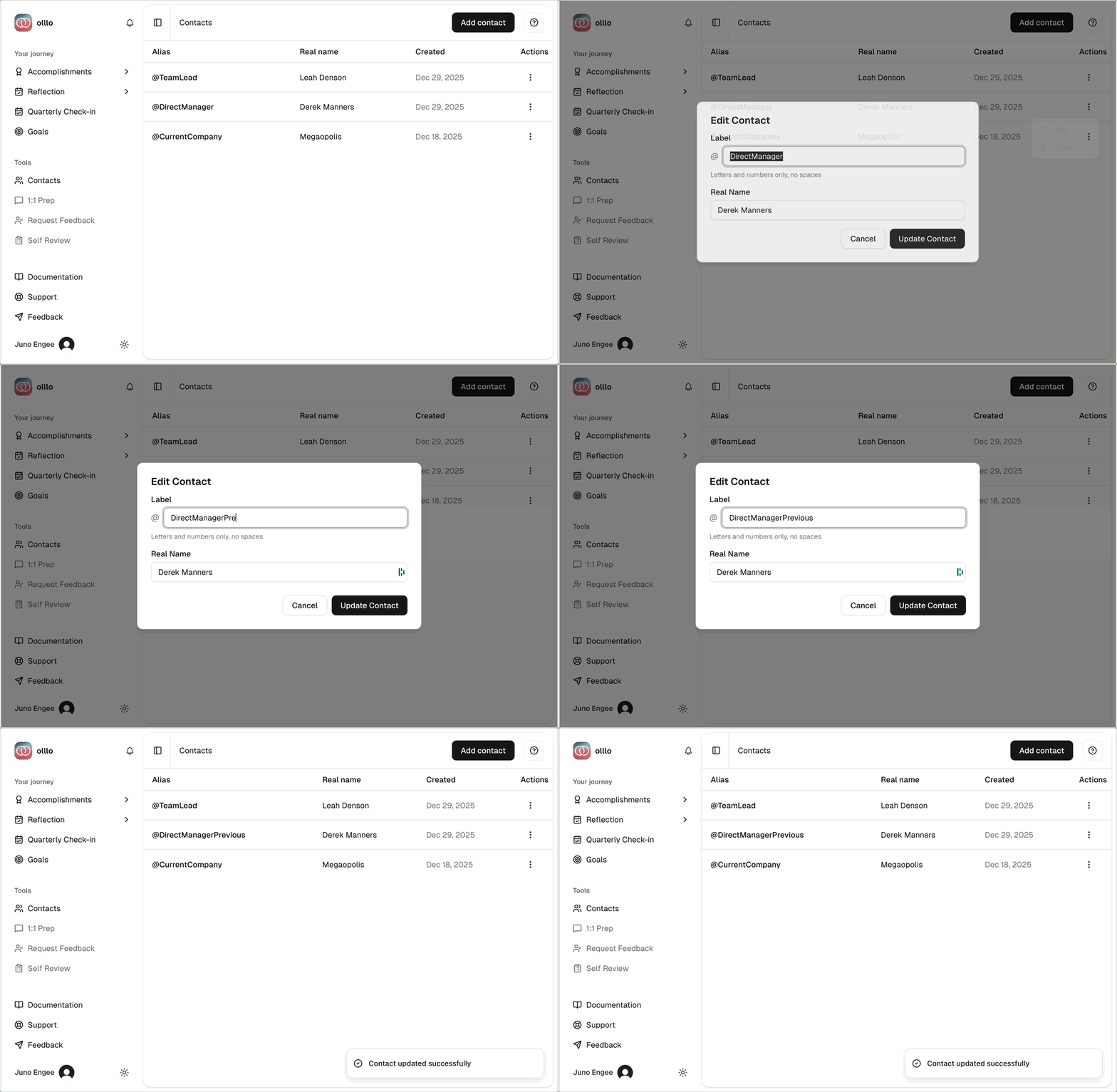
To update a contact:
- Find the contact in your list
- Click the Edit icon
- Update the Alias or Real Name fields
- Click Update Contact
Deleting Contacts
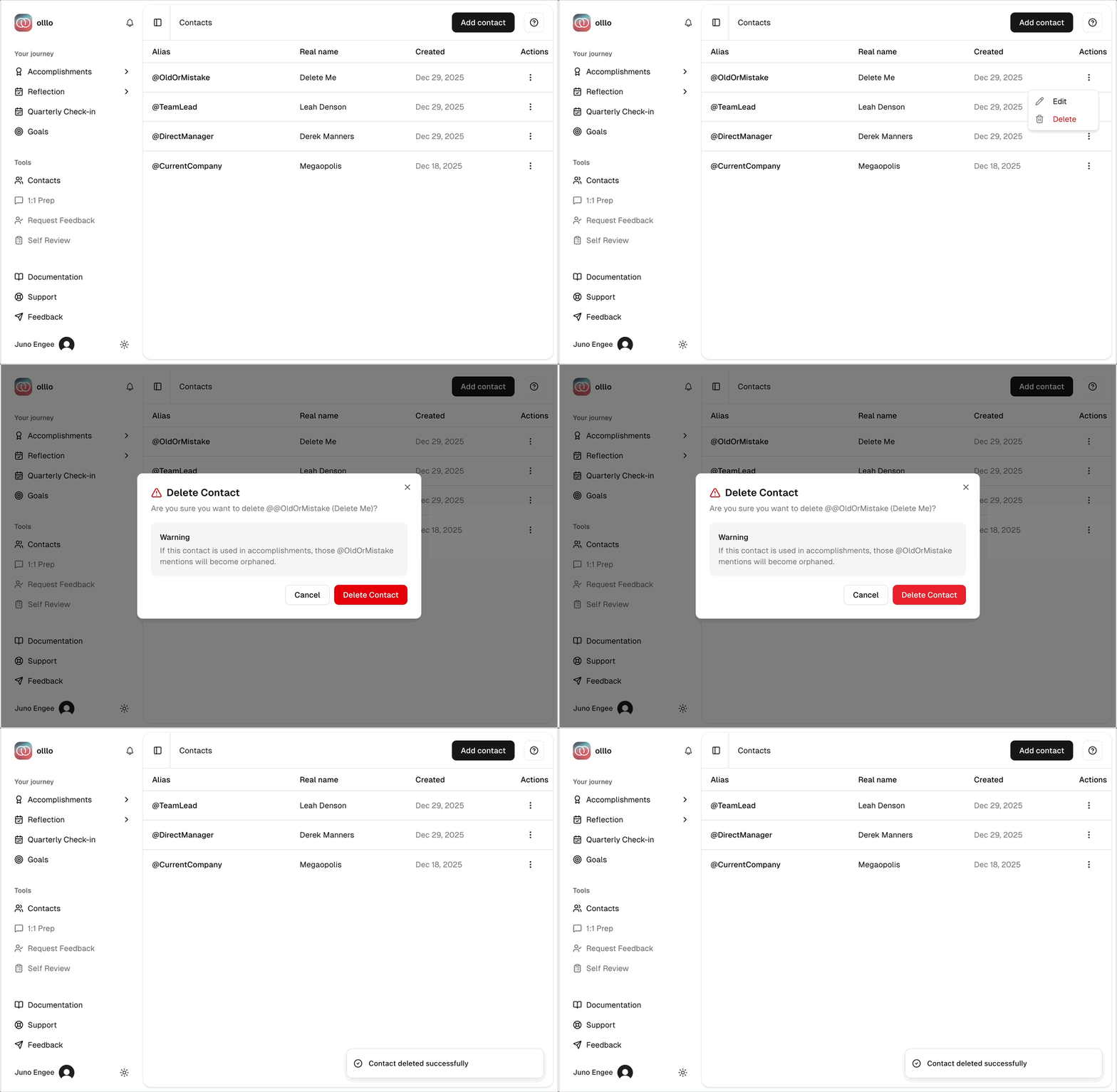
olllo protects you from breaking your accomplishments:
If the contact is used:
- You’ll see a warning with affected accomplishments count
- Example: “This contact is used in 5 accomplishments”
- Deleting will make those @-mentions “orphaned”
If the contact is unused:
- You can delete immediately
- No accomplishments will be affected
Orphaned mentions: @-mentions that reference deleted contacts are still visible but no longer map to a real name.
Privacy & Encryption
How Real Names Are Protected
When you create a contact:
- Encrypted storage: Real names are encrypted using AES-256-GCM before being stored in the database
- Decryption on demand: Real names are decrypted only when you view or edit contacts
- Database protection: Even if the database were compromised, encrypted real names would be unreadable without the encryption key
Encryption Details
- Algorithm: AES-256-GCM (industry standard)
- Key storage: Encryption key is stored securely in environment variables, separate from the database
- Export safety: Exported accomplishments use labels, not real names
Why This Matters
Your professional accomplishments are portable and safe:
You can export accomplishments and share them:
- In job applications (PII-free text)
- With career coaches (no privacy concerns)
- On LinkedIn (no sensitive information)
- In portfolios (privacy-safe achievements)
The real names stay with you, encrypted and secure.
Best Practices
Keep It Simple
Don’t over-complicate:
❌ Too many contacts:
- @Manager1, @Manager2, @Manager3
- @Engineer1, @Engineer2, @Engineer3

✅ Meaningful grouping:
- @DirectManager, @SkipLevel
- @SeniorEngineer, @TechLead
Aim for: 10-20 frequently used contacts for most people.
Ready to create your first contact? Start building your privacy-safe @-mention system.