Accomplishments
Track your professional wins, learnings, and achievements with olllo’s accomplishment tracking system - designed with privacy and career growth in mind.
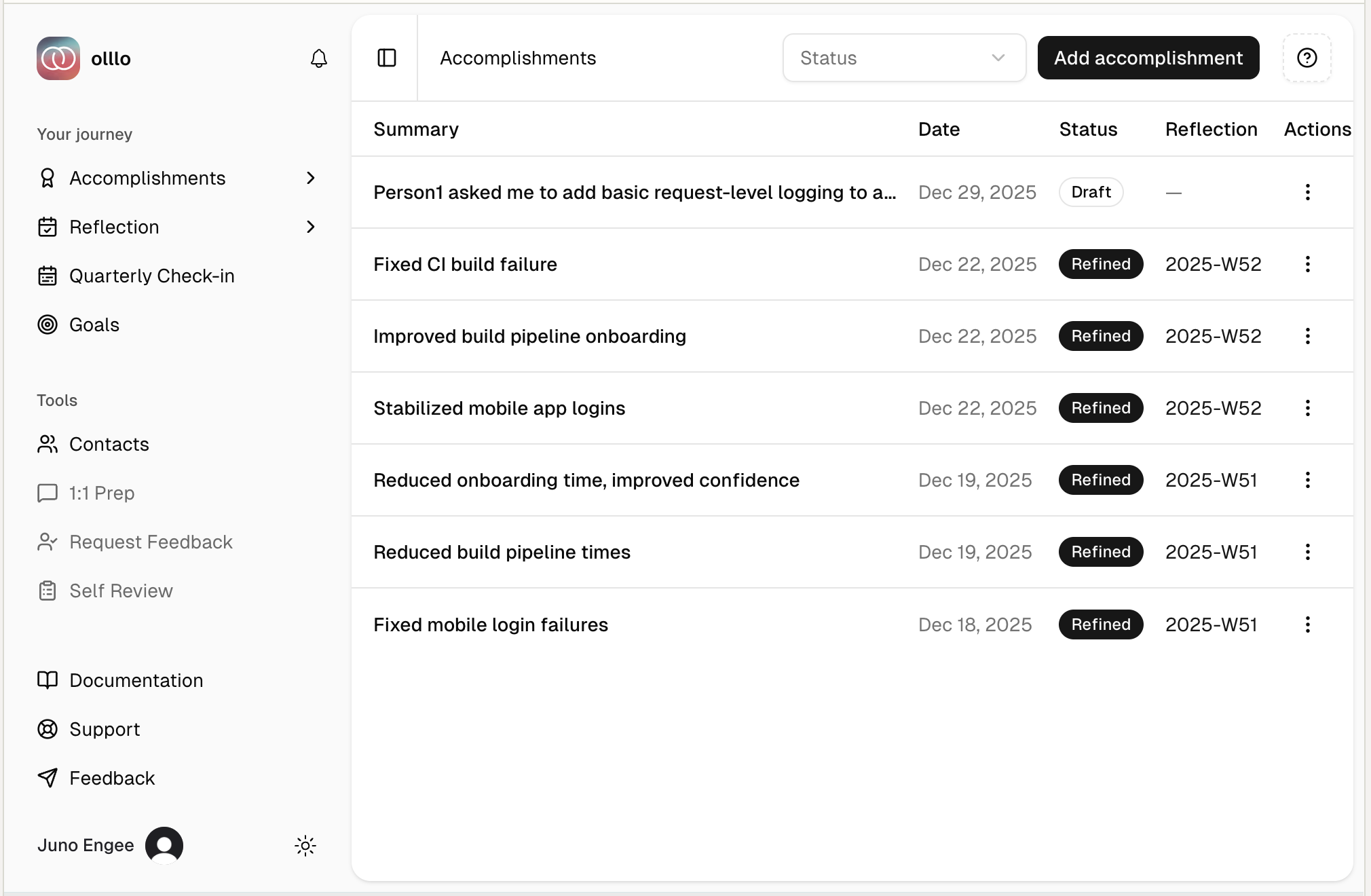
What is an Accomplishment?
An accomplishment is any professional achievement worth remembering. This can include:
- Project Milestones: Shipped a feature, completed a project phase
- Problem Solving: Fixed a critical bug, optimized performance
- Leadership: Mentored a team member, led a meeting
- Collaboration: Facilitated a successful partnership, resolved a conflict
What is outside the scope of an accomplishment?
- Learning: Mastered a new technology, completed a certification (Future feature)
- Recognition: Received positive feedback, won an award (Future feature)
- Personal Life: Events outside of work, such as family, friends, or hobbies
- Non-Work Related: Events that are not related to your professional work
- Non-Professional: Events that are not related to your professional work
- Non-Professional: Events that are not related to your professional work
Logging Accomplishments
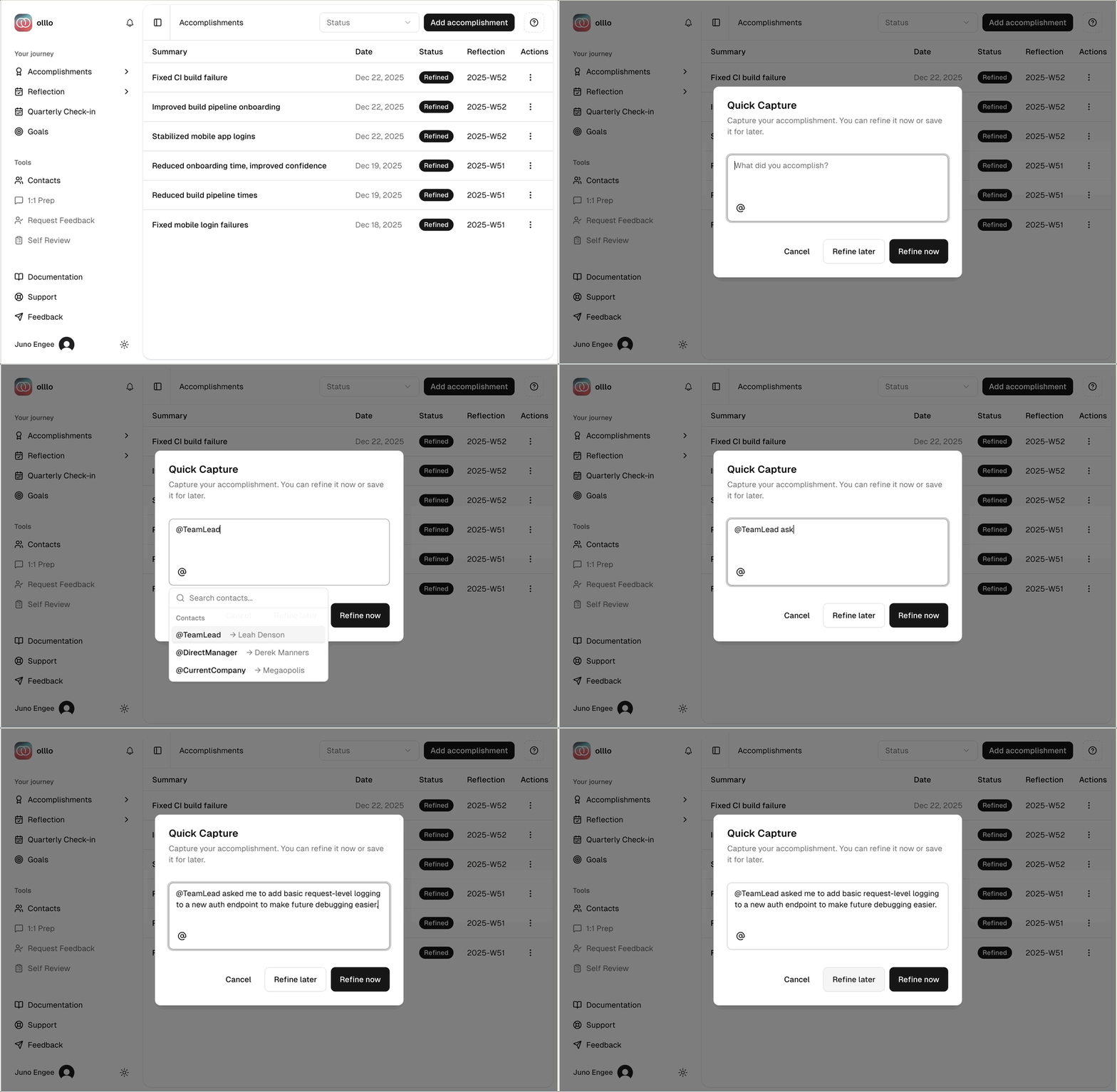
Quick Capture (Draft Mode)
For rapid logging without refinement:
- Click “New Accomplishment” or use the quick-add input
- Enter a brief description using @-mentions
- Click Save
- Your accomplishment is saved as a Draft
STAR Refinement
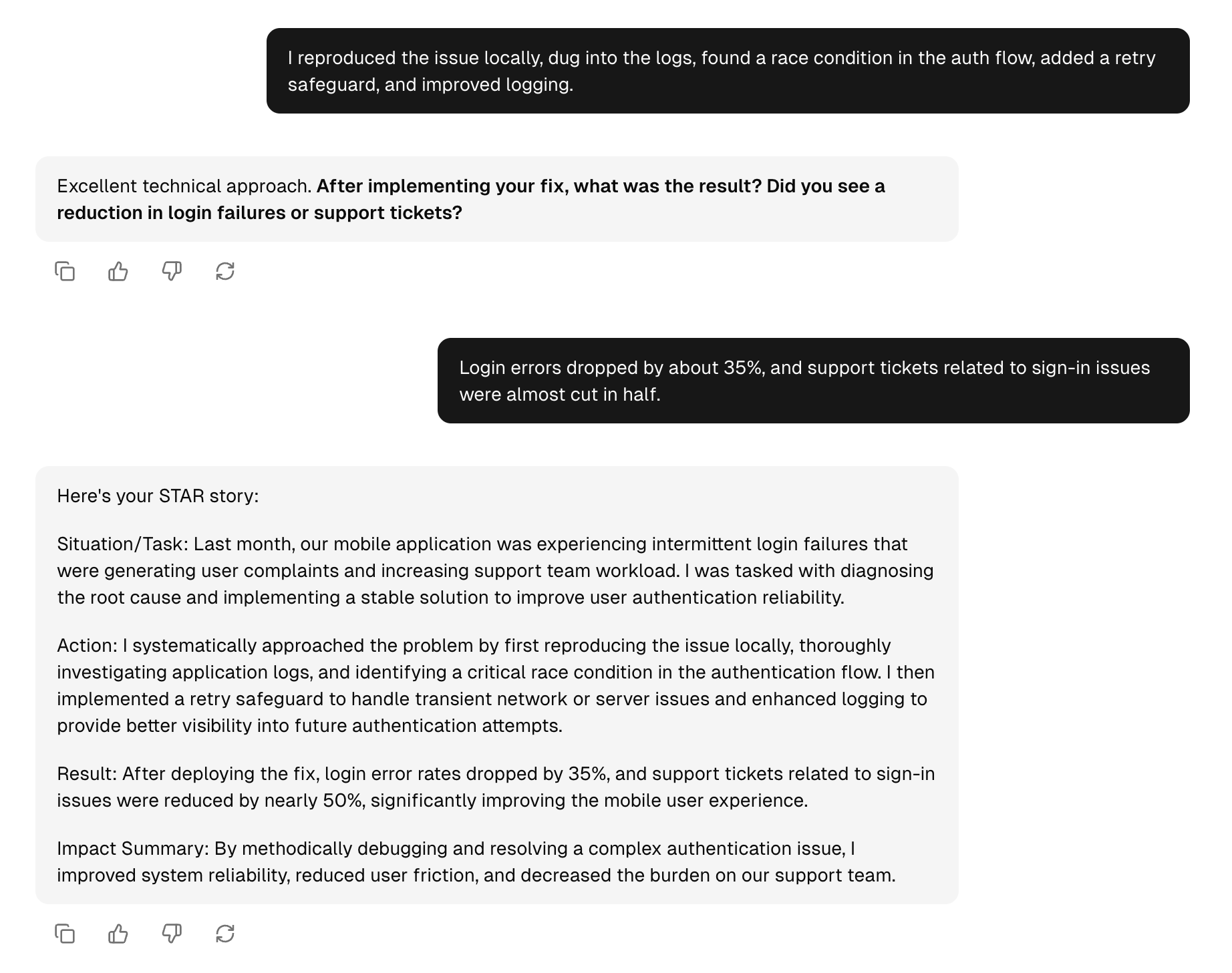
Transform your draft accomplishments into structured, interview-ready stories using the STAR method:
- Situation - The context or challenge
- Task - Your responsibility or goal
- Action - What you did specifically
- Result - The measurable outcome
When to Refine Now
Choose “Refine now” when:
- You have a few minutes for a guided conversation
- Details are fresh in your mind
- You want a polished, interview-ready story
When to Refine Later
Choose “Refine later” when:
- You’re doing a quick brain dump
- You’ll add details later
- You want to batch refinements weekly/monthly
STAR Refinement Process
When you click “Refine now”, olllo guides you through a conversational refinement:
- Situation/Task: AI asks about the context and your role
- Action: AI helps you detail specific steps you took
- Result: AI prompts for measurable outcomes
The AI will:
- Ask follow-up questions if sections are incomplete
- Suggest ways to quantify impact
- Help you avoid PII in your refined version
Viewing Refined Accomplishments
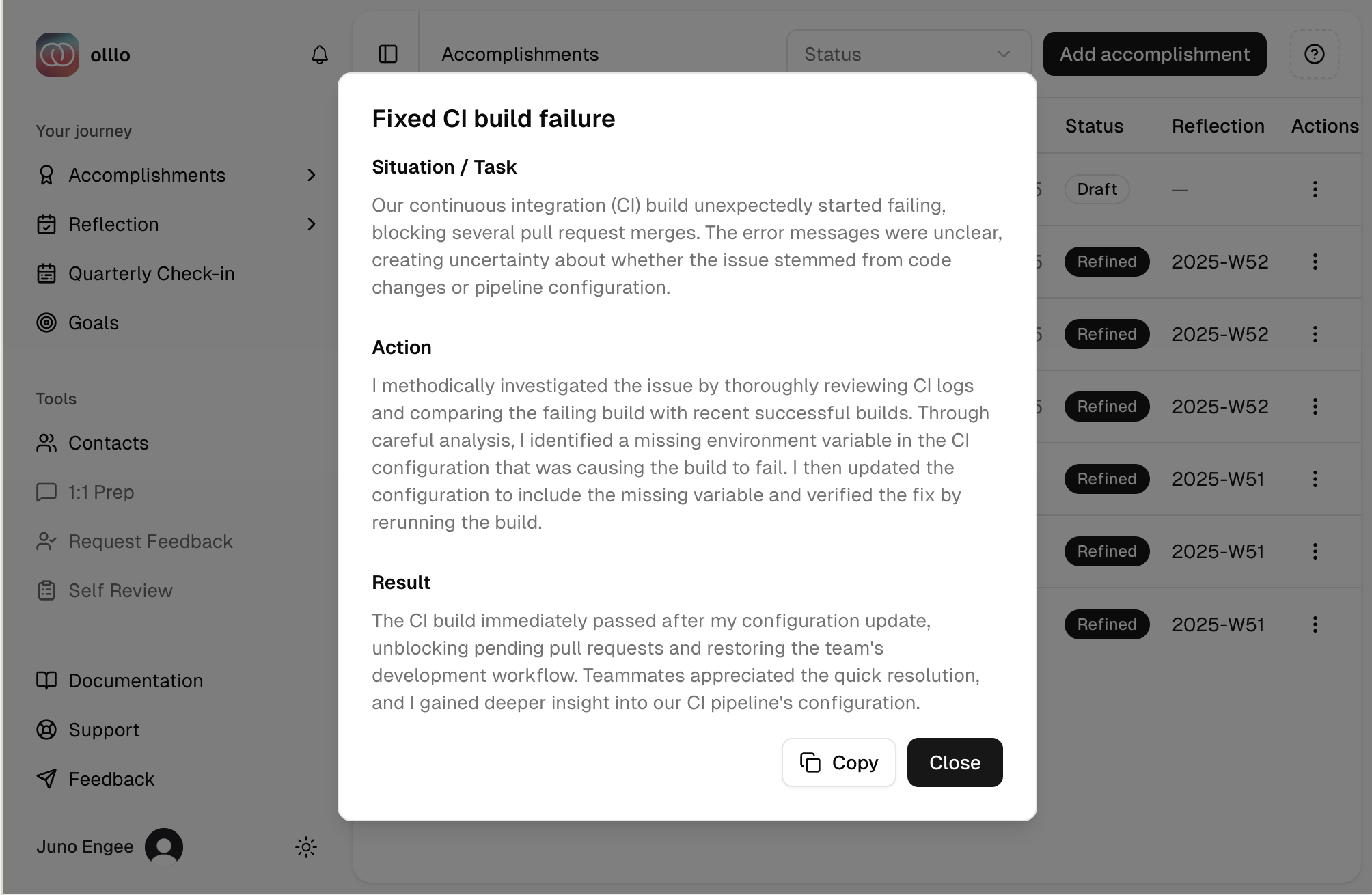
Click any Refined accomplishment to view:
- Your complete STAR story
- Copy to clipboard
Status Badges
Your accomplishments have clear status indicators:
- Draft (Yellow): Quick capture, not yet refined
- Refined (Green): Complete STAR format, interview-ready
Privacy-First Design
How olllo Protects Your Data
olllo uses @-mentions instead of real names to keep your accomplishments private and portable:
❌ Bad (Contains PII): "Worked with Jane Doe from Acme Corp"
✅ Good (Privacy-safe): "Worked with @DirectManager from @MainClient"
Why this matters:
- Your accomplishments never contain identifiable information
- You can safely export and share your achievements
- Your professional record stays with you, not tied to specific people or companies
Using @-Mentions
When logging an accomplishment, reference people and companies using @-mentions:
- Type
@to open the contacts dropdown - Select an existing contact or create a new label
- The real name is encrypted and stored separately
- Your accomplishment text only contains the label
Learn more: See Contacts Documentation for managing your @-mention labels.
PII Detection & Protection
olllo automatically scans your accomplishment text for personally identifiable information:
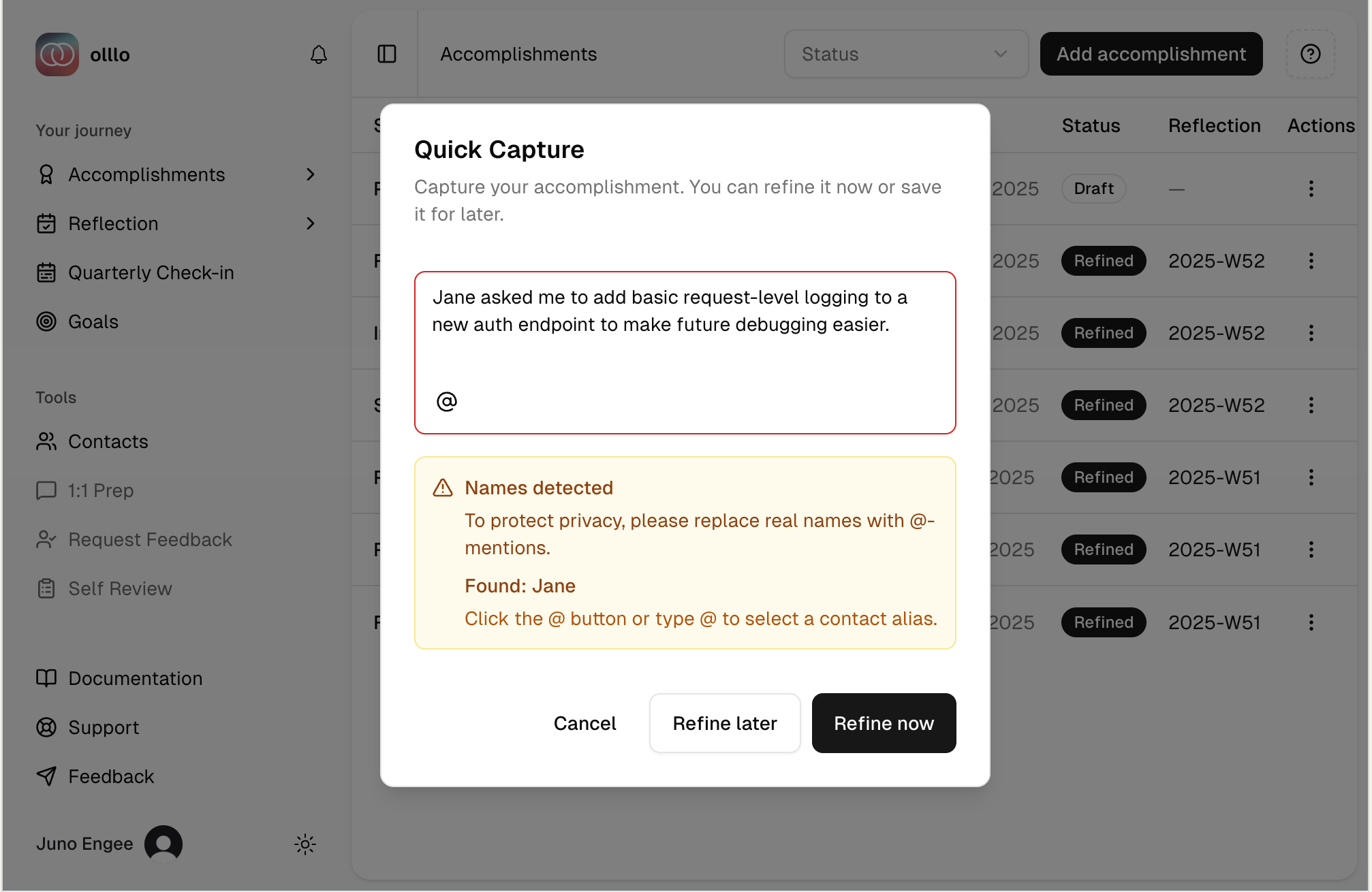
If real names or company names are detected, you’ll be prompted to:
- Create a contact with a privacy-safe label (e.g.,
@DirectManager) - Replace the PII with the label
- Submit your accomplishment safely
Protected entities:
- Personal names (e.g., “Jane Doe” →
@DirectManager) - Company names (e.g., “Acme Corp” →
@MainClient) - Product names that could identify companies
Best Practices
Log Regularly
- Daily brain dumps: Capture wins while fresh (use Draft mode)
- Weekly refinement: Batch-refine 3-5 drafts into STAR stories
- Monthly review: Export refined accomplishments for performance reviews
Use Meaningful @-Mention Labels
Create labels that you’ll remember:
✅ Good labels:
- @DirectManager
- @SeniorEngineer
- @ProductLead
- @MainClient
- @DesignTeam

❌ Vague labels:
- @Person1
- @Manager
- @Client
Quantify Results
The AI will help you find metrics, but think about:
- Users impacted: “Improved experience for 50K+ users”
- Time saved: “Reduced deploy time from 2h to 15min”
- Revenue: “Generated $200K in annual savings”
- Performance: “Decreased load time by 60%”
- Quality: “Reduced bug reports by 75%“
Small Wins Matter
Don’t wait for major achievements:
✅ Worth logging:
- Helped @Intern debug their first production issue
- Documented a complex API endpoint
- Gave constructive feedback in code review
- Organized team knowledge-sharing session
Using Accomplishments
Performance Reviews
Export refined accomplishments to:
- Prepare for 1-on-1s with your manager
- Write self-assessments with concrete examples
- Build a promotion case with quantified impact
Interview Preparation
Your refined accomplishments are ready-to-use STAR stories:
- Filter by skill or project type
- Review STAR breakdowns
- Practice delivering them confidently
Career Development
Review your accomplishment history to:
- Identify skill patterns and gaps
- Spot your biggest impact areas
- Set goals for future achievements
Tip: Connect accomplishments to your career goals to track progress. Use activities to plan the next steps that will lead to future accomplishments.
Searching & Filtering
Find accomplishments quickly:
- Filter by status: View all drafts to batch-refine
- Search by keyword: Find specific @-mentions, skills, or projects
- Sort by date: See your most recent wins
Privacy & Data Ownership
Your accomplishments are:
- Encrypted: All @-mention real names use AES-256-GCM encryption
- Private by default: Only you have access
- Portable: Export anytime in multiple formats
- PII-free: Safe to share without revealing identities
Your data, your control: Real names behind your @-mentions are encrypted before being stored in the database, protecting them from unauthorized access.
Ready to start? Log your first accomplishment and build your privacy-safe professional record.